
1. Menu: Click Settings.
2. Click System Parameter which located under Payroll.

3. Edit the Configuration.
4. Click Save button.
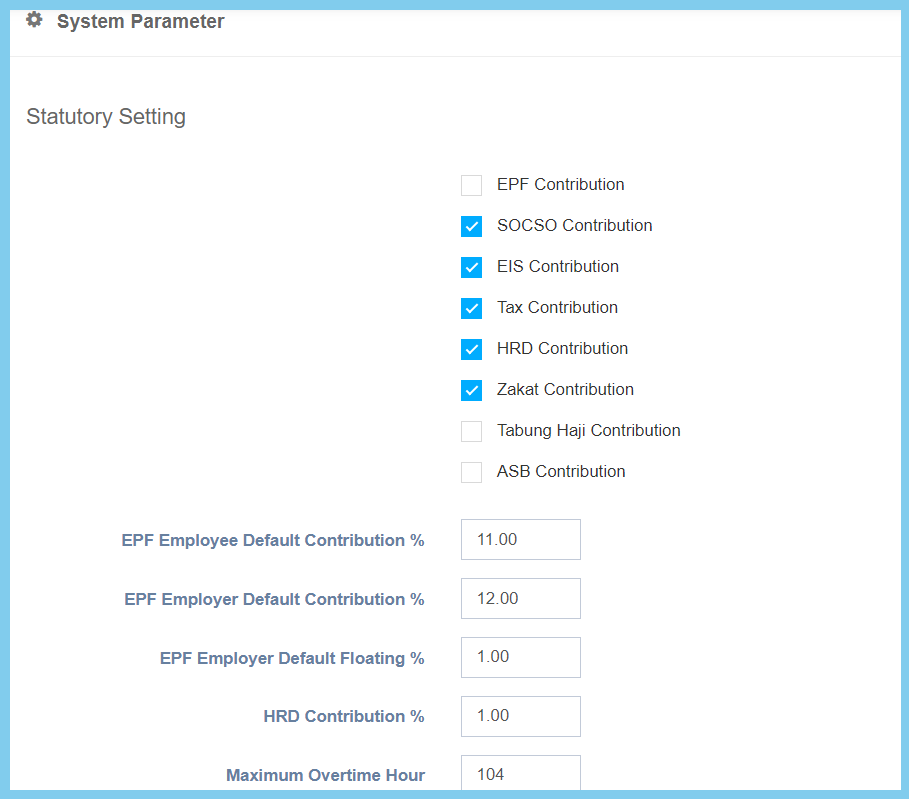
System Parameter Configuration Option Explaination
| Option | Allowed Values | Description |
|---|---|---|
| EPF Contribution |
|
This is a contribution setting that can enable the EPF deduction. |
| SOCSO Contribution |
|
This is a contribution setting that can enable the SOCSO deduction. |
| EIS Contribution |
|
This is a contribution setting that can enable the EIS deduction. |
| Tax Contribution |
|
This is a contribution setting that can enable the Tax deduction. |
| HRD Contribution |
|
This is a contribution setting that can enable the HRD deduction. |
| Zakat Contribution |
|
This is a contribution setting that can enable the Zakat deduction. |
| Tabung Haji Contribution |
|
This is a contribution setting that can enable the Tabung Haji deduction. |
| ASB Contribution |
|
This is a contribution setting that can enable the ABS deduction. |
| EPF Employee Default Contribution % | Any number | This is the setup for the percentage upon the contribution ratio of an employee’s EPF. |
| EPF Employer Default Contribution % | Any number | This is the setup for the percentage upon the contribution ratio of an employer’s EPF. |
| EPF Employer Default Floating % | Any number | This is the setup for the percentage upon the floating ratio of an employer’s EPF. |
| HRD Contribution % | Any number | This is the setup for the percentage upon the contribution ratio of HRD. |
| Maximum Overtime Hour | Any number | This is the maximum hour time limit for the overtime. |
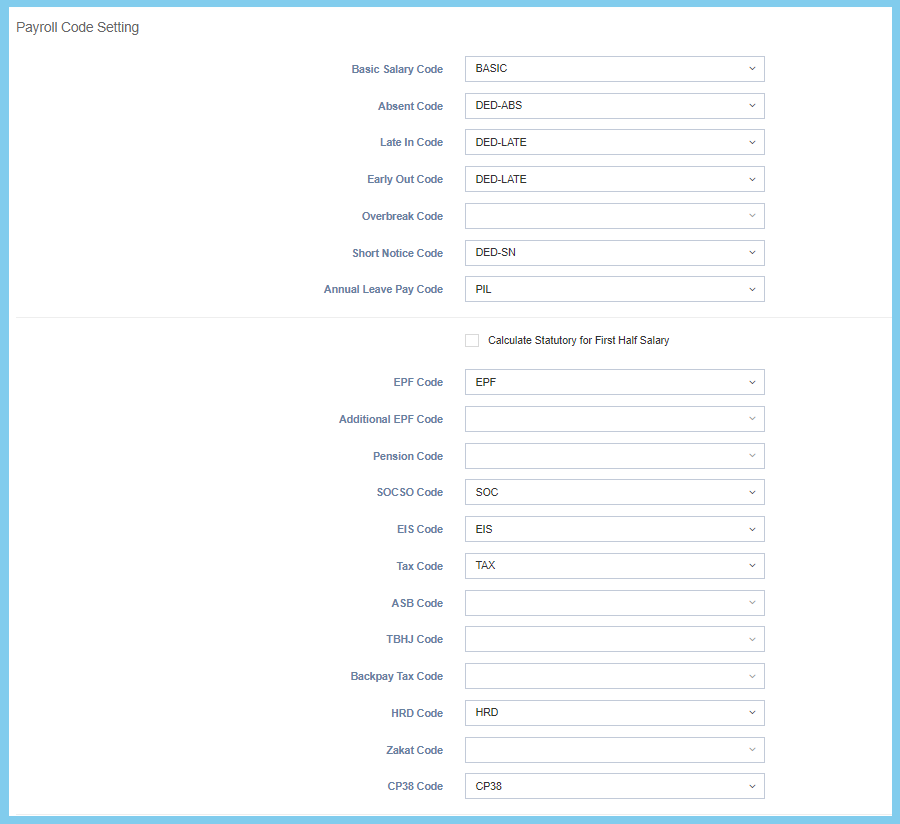
Note: This part is mainly for payroll code settings.
| Option | Allowed Values | Description |
|---|---|---|
| Basic Salary Code | Choose from Transaction Code | This setting is to configure the default code for basic salary. |
| Absent Code | Choose from Transaction Code | This setting is to configure the default code for absent. |
| Late In Code | Choose from Transaction Code | This setting is to configure the default code for late in. |
| Early Out Code | Choose from Transaction Code | This setting is to configure the default code for early out. |
| Overbreak Code | Choose from Transaction Code | This setting is to configure the default code for overbreak. |
| Short Notice Code | Choose from Transaction Code | This setting is to configure the default code for short notice. |
| Annual Leave Pay Code | Choose from Transaction Code | This setting is to configure the default code for annual leave pay. |
| Calculate Statutory for First Half Salary |
|
This setting is to let the calculation of the statutory for first half salary only. |
| EPF Code | Choose from Transaction Code | This setting is to configure the default code for EPF. |
| Additional EPF Code | Choose from Transaction Code | This setting is to configure the default code for Additional EPF. |
| Pension Code | Choose from Transaction Code | This setting is to configure the default code for pension. |
| SOCSO Code | Choose from Transaction Code | This setting is to configure the default code for SOCSO. |
| EIS Code | Choose from Transaction Code | This setting is to configure the default code for EIS. |
| Tax Code | Choose from Transaction Code | This setting is to configure the default code for Tax. |
| ASB Code | Choose from Transaction Code | This setting is to configure the default code for ABS. |
| TBHJ Code | Choose from Transaction Code | This setting is to configure the default code for TBHJ. |
| Backpay Tax Code | Choose from Transaction Code | This setting is to configure the default code for Backpay Tax. |
| HRD Code | Choose from Transaction Code | This setting is to configure the default code for HRD. |
| Zakat Code | Choose from Transaction Code | This setting is to configure the default code for Zakat. |
| CP38 Code | Choose from Transaction Code | This setting is to configure the default code for CP38. |
Note: Click here to view setup.
| Option | Allowed Values | Description |
|---|---|---|
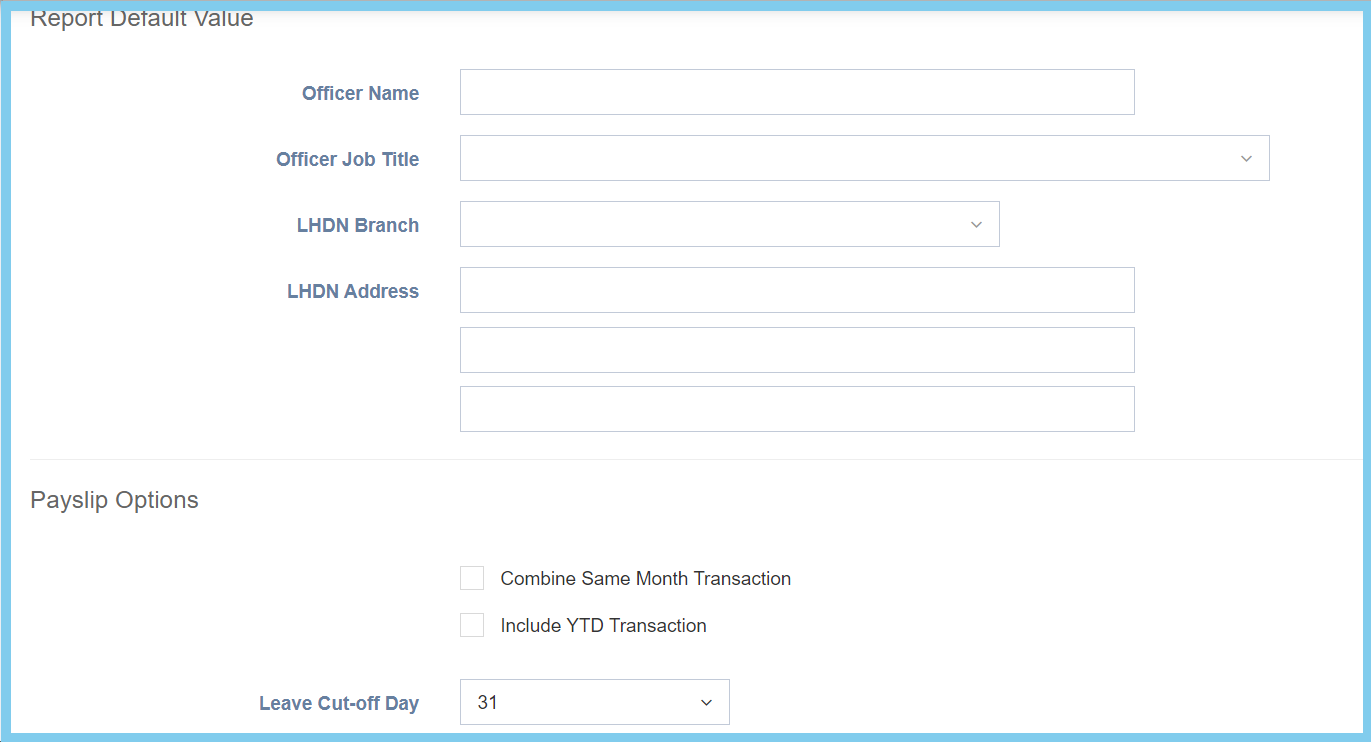
| Officer Name | Any alphanumeric | Set the name for LHDN officer. |
| Officer Job Title | Setup from code settings | Select the job title for LHDN officer.
Click here to view setup for job title. |
| LHDN Branch | Setup from code settings | This setting is to set up the LHDN branch.
Click here to view setup for company branch. |
| LHDN Address | Any alphanumeric | Write the valid LHDN Address. |
| Combine Same Month Transaction |
|
This setting allows the transaction within the same month to be combined for payroll purposes. |
| Include YTD Transaction |
|
This setting allows the year to date transaction to be included within the payslip |
| Leave Cut-Off Day | Choose from day | This is the cut-off day setting for the leave after a specific limit of days. |
| Option | Allowed Values | Description |
|---|---|---|
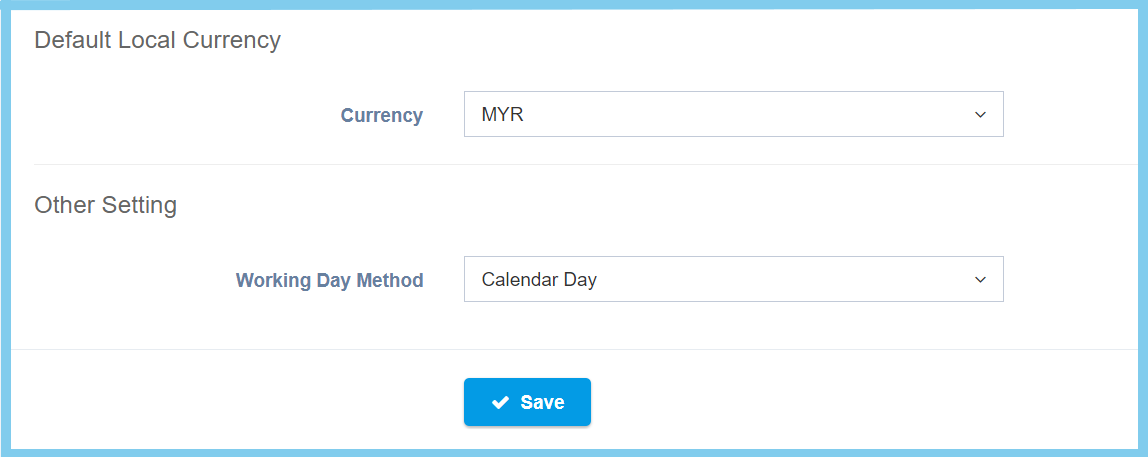
| Currency | Setup from currency code | This setting is to set up the default currency used within the company.
Click here to view setup. |
| Working Day Method |
|
This record shows the method of the working days according to the selections, which are
|
