
1. Menu: Click Settings.
2. Click Bonus Setting which located under Payroll.

3. Edit the Configuration.
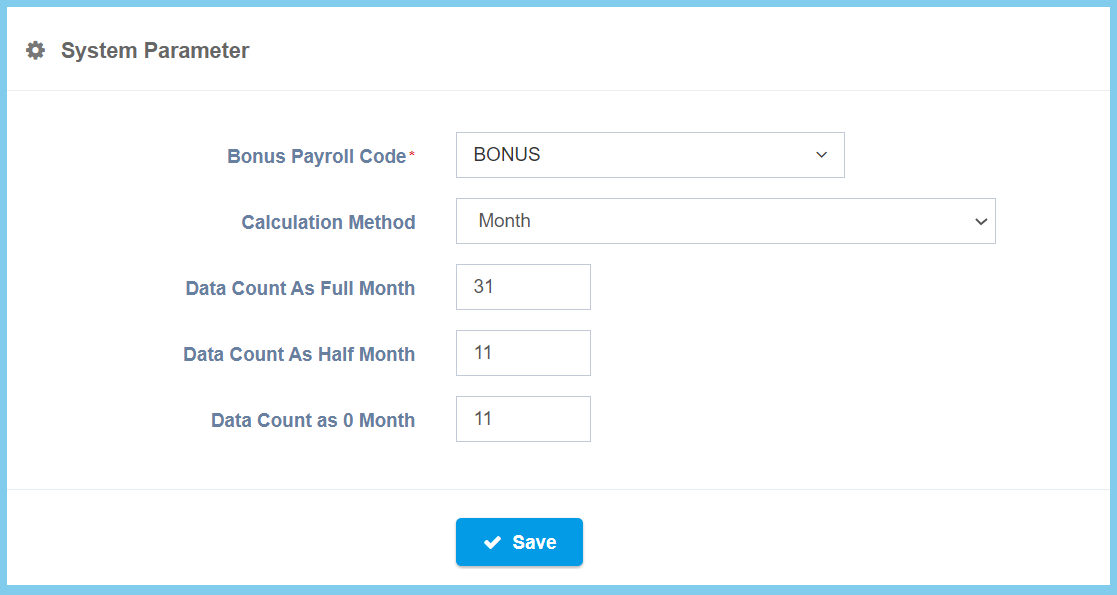
4. Click Save button.
Bonus Setting Configuration Option Explaination
| Option | Allowed Values | Description |
|---|---|---|
| Bonus Payroll Code | Setup from transaction code | This is the bonus payroll code that allows the user to choose the bonus code from the selection within.
Click here to view setup. |
| Calculation Method |
|
This is the calculation method for bonus, user can choose calculate either by day or by month. |
| Date Count As Full Month | Any number | Set a date to count as full month. |
| Date Count As Half Month | Any number | Set a date to count as half month. |
| Date Count As 0 Month | Any number | Set a date to count as 0 month. |
