
1. Menu: Click Settings.
2. Click Transaction Code which located under Payroll.

3. Click edit button on which transaction code that you wish to edit.

4. Edit the form.
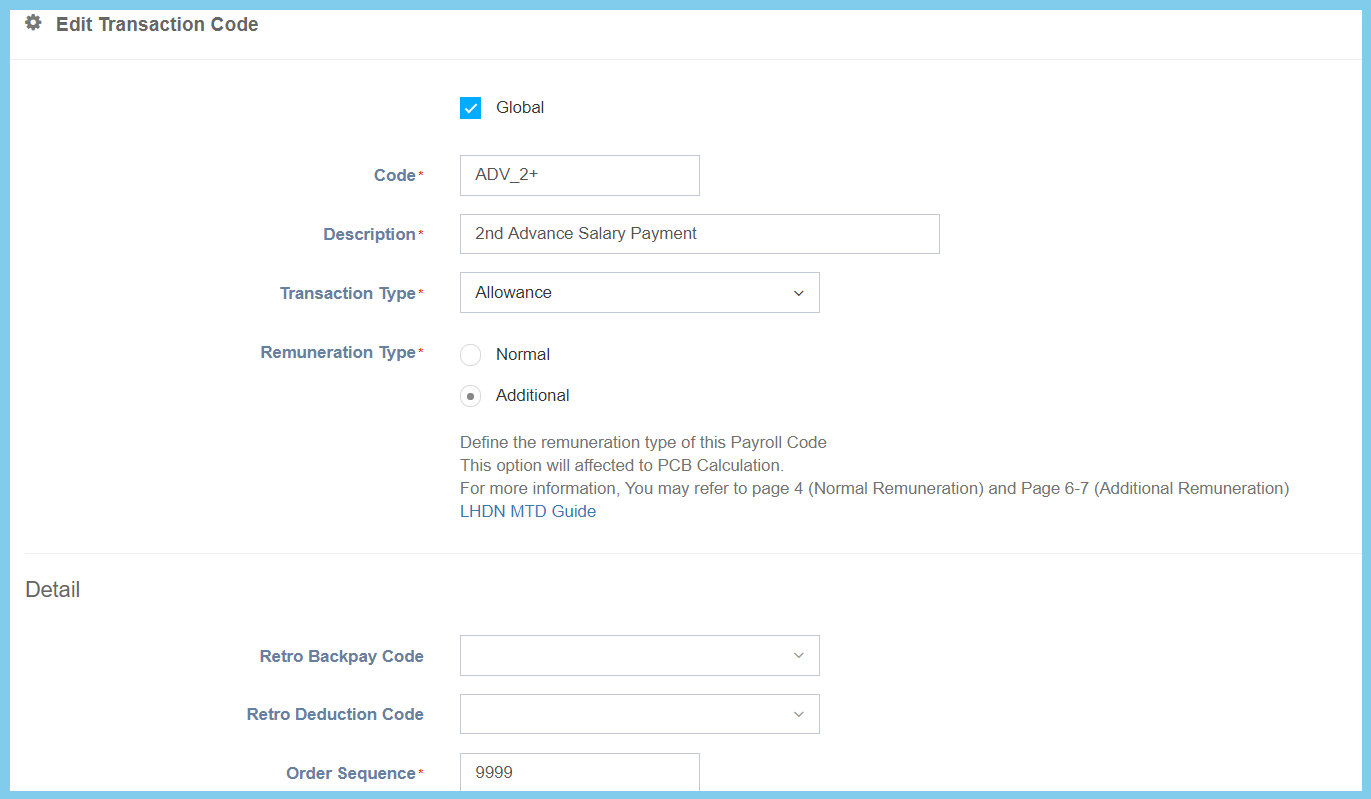
5. Click Save button.
Transaction Code Configuration Option Explaination
| Option | Allowed Values | Description |
|---|---|---|
| Global |
|
If global is enabled, the code will be visible from other companies. If not, it can only be used by its own company. |
| Code | Any alphanumeric | Set a simple and unique transaction code. |
| Description | Any alphanumeric | The description of the code, can also be set as the name of the code. |
| Transaction Type |
|
This is the transaction type to set up its type of uses in payroll for sorting purposes. |
| Remuneration Type |
|
This is the remuneration type for the payroll payment method and the option will affect PCB Calculation. |
| Retro Backpay Code | Setup from Transaction Code | A code selection for retro back pay purposes.
Click here to view setup. |
| Retro Deduction Code | Setup from Transaction Code | A code selection for retro deduction purposes.
Click here to view setup. |
| Order Sequence | Any number | A number to set up the ordering sequence of the code. |
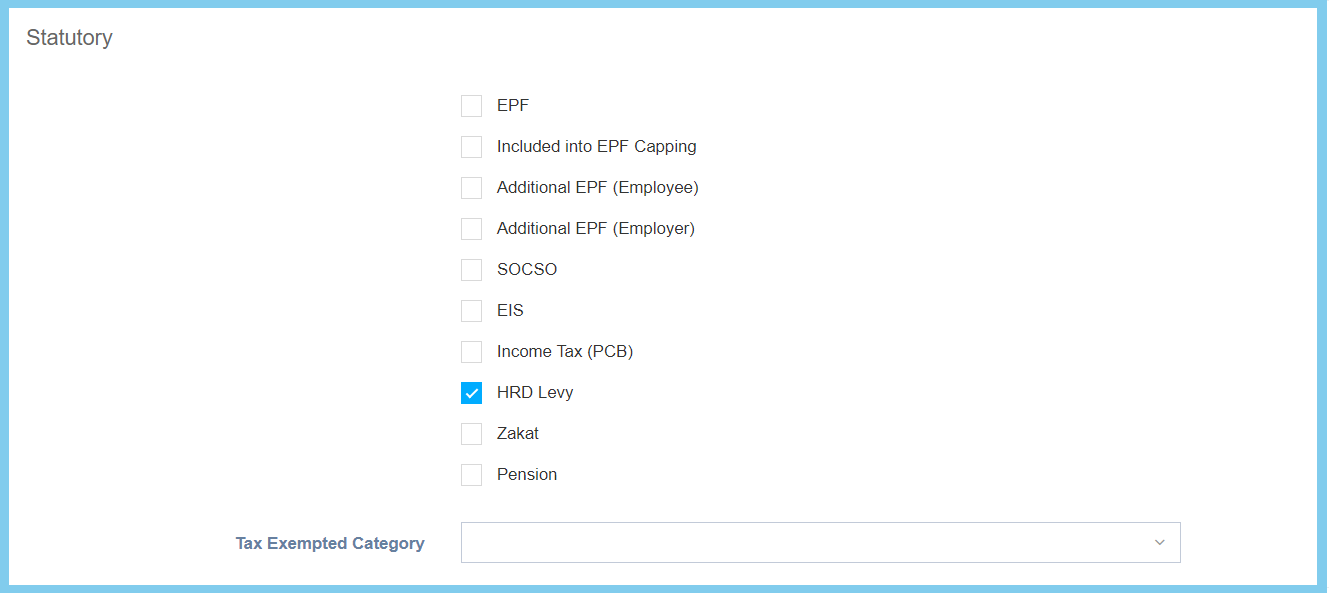
| Option | Allowed Values | Description |
|---|---|---|
| EPF |
|
If enabled, the transaction code is required for EPF. |
| Included into EPF Capping |
|
If enabled, the transaction code is included in the EPF capping. |
| Additional EPF (Employee) |
|
If enabled, the transaction code is required for additonal EPF of employee. |
| Additional EPF (Employer) |
|
If enabled, the transaction code is required for additonal EPF of employer. |
| SOCSO |
|
If enabled, the transaction code is required for SOCSO. |
| EIS |
|
If enabled, the transaction code is required for EIS. |
| Income Tax (PCB) |
|
If enabled, the transaction code may required for PCB. |
| HRD Levy |
|
If enabled, the transaction code is required for HRD Levy. |
| Zakat |
|
If enabled, the transaction code is required for zakat. |
| Pension |
|
If enabled, the transaction code is required for pension. |
| Tax Exempted Category | Selection from tax exempted category | A code selection that allowing certain tax exemption when this code is being used. |
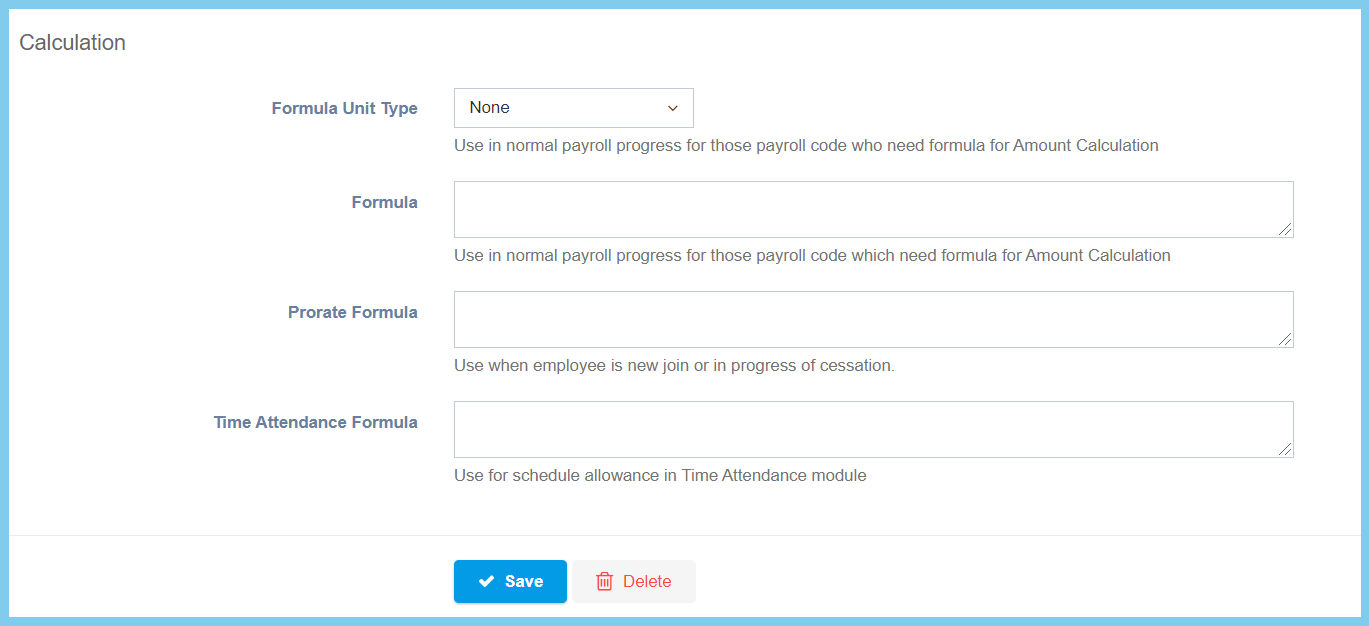
| Option | Allowed Values | Description |
|---|---|---|
| Formula Unit Type |
|
Choose the type of formula unit that is used when the code needs formula to process amount calculation. |
| Formula | Any alphanumeric | Calculation formula that is used when the code needs formula to process amount calculation.
Refer to formula page. |
| Prorate Formula | Any alphanumeric | Calculation formula that is used when the selected employee is new join or in progress of cessation.
Refer to formula page. |
| Time Attendance Formula | Any alphanumeric | Calculation formula that is used for the time attendance schedule allowance.
Refer to formula page. |
