
1. Edit Employee Profile.
2. Click Education.
3. Click edit button on which education that you wish to edit.
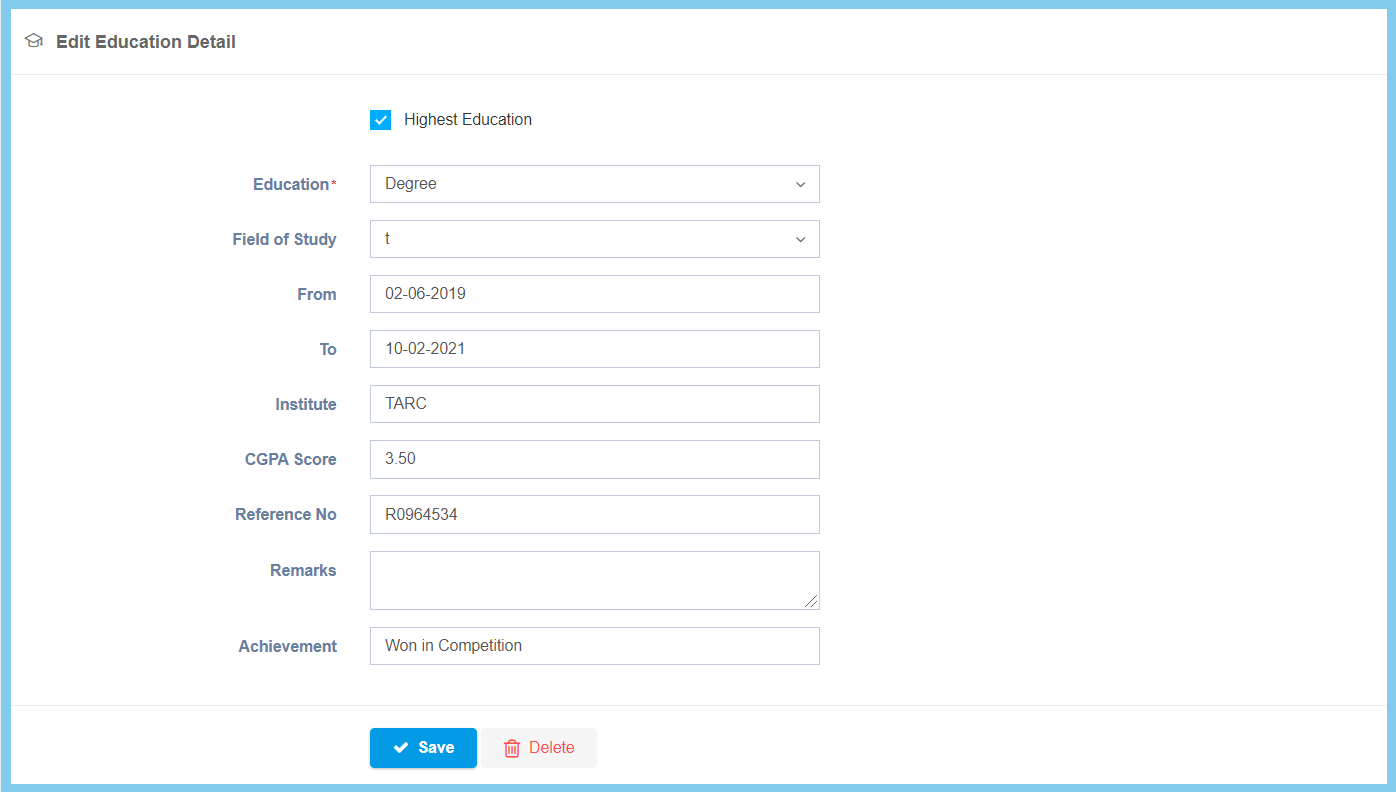
4. Edit the form.
5. Click Save button.
Education Configuration Option Explaination
| Option | Allowed Values | Description |
|---|---|---|
| Highest Education |
|
If enabled, this education is the employee highest education. |
| Field of Study | Setup from code settings | Select employee field of study from option available.
Click here to view setup for field of study. |
| From | Select date from calendar | Select the start date of employee start their education from calendar available. |
| To | Select date from calendar | Select the end date of employee finish their education from calendar available. |
| Institute | Any alphanumeric | Enter the institute name of where the employee study from. |
| CGPA Score | Any number | Enter employee lastest CGPA. |
| Reference No | Any alphanumeric | Enter employee reference number that related to this education. |
| Remarks | Any alphanumeric | Any additional remark about this education. |
| Achievement | Any alphanumeric | Enter employee achievement that related to this education. |
