
1. Menu: Click Settings.
2. Click Service Charge Calculation which located under Payroll.

3. Edit the Configuration.
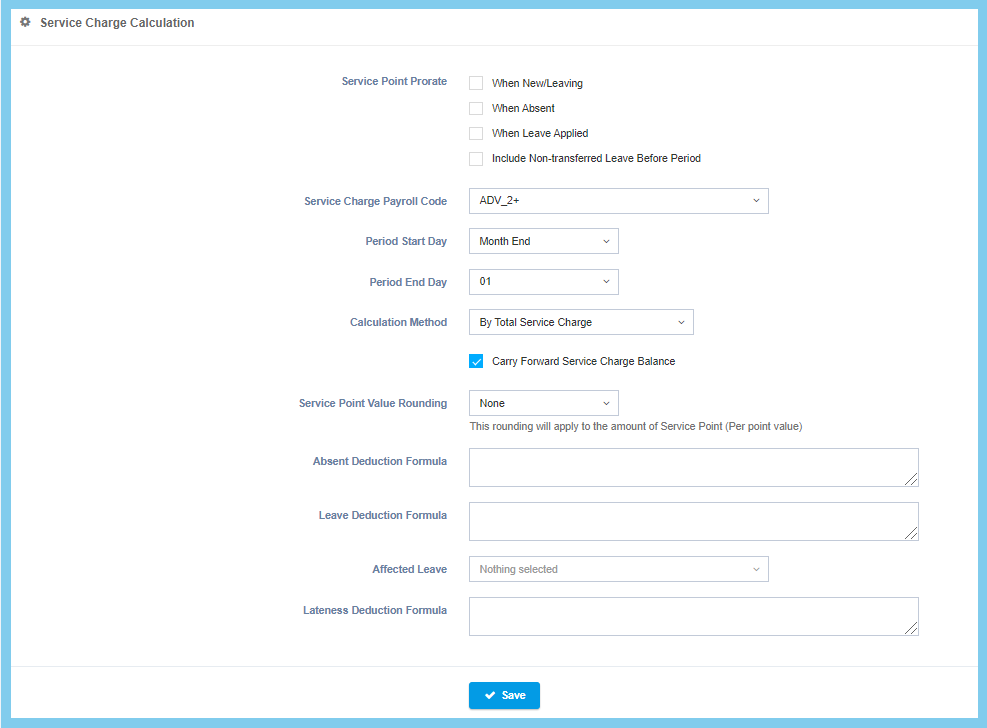
4. Click Save button.
Service Charge Calculation Configuration Option Explaination
| Option | Allowed Values | Description |
|---|---|---|
| When New/Leaving |
|
Set to configure the service point prorate when new or leaving employees are within the payroll record. |
| When Absent |
|
Set to configure the service point prorate when an employee’s absent attendance is within the payroll record. |
| When Leave Applied |
|
Set to configure the service point prorate when leave is being applied by the employee is within the payroll record. |
| Include Non-transferred Leave Before Period |
|
Set to configure the service point prorate when the payroll record includes non-transferred leave before period. |
| Service Charge Payroll Code | Setup from transaction code | Select the payroll code for the service charges purposes within the payroll.
Click here to view setup. |
| Period Start Day (Top) | Choose from day | Set the day within a month which will be the start day for the period. |
| Period Start Day (Bottom) | Choose from day | Set the day within a month which will be the end day for the period. |
| Calculation Method |
|
Select one of the calculation method for calculate a payroll. |
| Carry Forward Service Charge Balance |
|
Set the configuration to allow the carry forward of service charge balance or vice versa. |
| Service Point Value Rounding |
|
Set the rounding method for the service point value. |
| Absent Deduction Formula | Any alphanumeric | Set up a formula for the absent deduction for the payroll calculation.
Refer to formula page. |
| Leave Deduction Formula | Any alphanumeric | Set up a formula for the leave deduction for the payroll calculation.
Refer to formula page. |
| Affected Leave | Setup from leave code | Select one of the leave code that will affected to service charge calculation.
Click here to view setup. |
| Lateness Deduction Formula | Any alphanumeric | Set up a formula for the lateness deduction for the payroll calculation.
Refer to formula page. |
